> ## Documentation Index
> Fetch the complete documentation index at: https://sequence-0fb8d9e6-api_docs.mintlify.site/llms.txt
> Use this file to discover all available pages before exploring further.
# Intro to Jelly Forest - Unity Game Guide
> Intro to Jelly Forest - Unity Game Guide introduces a 2D runner game with blockchain features like social sign-in, upgrades, and cosmetic items stored in a smart contract wallet.
Jelly Forest is a blockchain-enabled 2D runner game. The game features social sign in, multi-tiered upgrades (with higher tier requiring lower tier upgrades as inputs to build/mint), and cosmetic upgrades, all of which are stored in an embedded non-custodial smart contract wallet. There are no transaction signing popups or gas fee payment requirements emposed on players.
Download it with Google Play [here](https://play.google.com/store/apps/details?id=app.sequence.jelly_forest)!
Learn [why smart contract wallets here](/solutions/technical-references/smart-contract-wallets)
Learn [what an embedded wallet is here](/solutions/wallets/developers/embedded-wallet/overview)
This guide will walk you through how we built Jelly Forest and how you too can build your own web3 game using [Sequence's Unity SDK](/sdk/unity/overview/)!
## 1. Build a game loop
Step number one is building basic game loop. Don't forget to think about your monetization strategy and how you'll be using web3 elements first!
For our game loop, we purchased the [Infinite Runner Engine](https://assetstore.unity.com/packages/templates/systems/2d-3d-infinite-runner-engine-51328) from the Unity Asset Store. Inside the asset, we found a demo scene `JellyForest`, which, with a few tweaks, we were able to get a functional build from on iOS and Android.
## 2. Integrate social sign in and Sequence's Embedded Wallet solution
### Configuration
1. [Install Sequence's Unity SDK Using Package Manager](/sdk/unity/installation#package-manager---recommended)
2. [Sign in to the Sequence Builder Console](/solutions/builder/getting-started)
3. [Create a Project For Your Game in the Builder Console](/solutions/builder/project-management)
4. Setup an [Embedded Wallet in the Builder Console](/solutions/builder/embedded-wallet#embedded-wallet-in-builder)
5. In your `SequenceConfig` [scriptable object](https://docs.unity3d.com/Manual/class-ScriptableObject.html) which you imported via the Samples menu in Package Manager during the [installation stage](/sdk/unity/installation#package-manager---recommended), add your Google and Apple client ids which you added to the Builder as well as your Configuration Key under `WaaSConfigKey`
* Don't forget to put your Android and iOS client ids under their respective platforms!
6. Add your [Builder API Key from the Builder Console](/solutions/builder/getting-started#claim-an-api-access-key) under `Settings > API Access Keys` - you want the `prod` key
### Social Sign In
1. Create a basic scene where you will have your players login.
* In our case, we [created a new scene](https://docs.unity3d.com/Manual/scenes-working-with.html#creating-a-new-scene) and added a background image to it
2. Create a `Canvas`, attach a `Canvas Scaler` component and use the "Scale with Screen Size" UI Scale Mode. This will make it so that the LoginPanel (and any other UI elements under this Canvas) are scaled automatically when switching between build targets.
3. Drag the `LoginPanel` prefab into your Scene Hierarchy under the Canvas. This can be found in the Project window under `Packages > Sequence Embedded Wallet SDK > SequenceFrontend > Prefabs`.
4. Create a UI manager to call `Open` on the `LoginPanel`. See [our implementation](https://github.com/0xsequence/sequence-unity-demo/blob/JellyForest/Scripts/UI/LoginScreenUIManager.cs) below:
```csharp theme={null}
private void Start()
{
LoginPanel loginPanel = GetComponentInChildren();
if (loginPanel == null)
{
Debug.LogError("LoginPanel not found!");
}
loginPanel.Open();
}
```
5. Break the reference to the `LoginPanel` prefab in the Hierarchy so that you can edit it freely in the scene view
1. Select the `LoginPanel` GameObject in the Hierarchy
2. Right click the `LoginPanel` GameObject in the Hierarchy
3. `Prefab > Unpack Completely`
6. Customize the LoginPanel to fit your game's theme
The LoginPanel will handle all of the social sign in logic for you. If you're curious how it's implemented, you can checkout the `LoginPage` and `OpenIdAuthenticator` implementations.
The authentication works via the [Open ID Connect Implicit Flow](https://auth0.com/docs/authenticate/login/oidc-conformant-authentication/oidc-adoption-implicit-flow).
### Registering a Session with the Sequence API
Once social sign in is complete, you will automatically make a register session request with the Sequence WaaS (Wallet as a Service) APIs. Here's how it works:
When social sign in is complete, the `OpenIdAuthenticator.SignedIn` event is fired. This initiates the authorization process in `SequenceLogin.ConnectToWaaS`.
### Retrieving the User's Wallet
In order to retrieve the wallet, you'll need to subscribe to the `SequenceWallet.OnWalletCreated` event.
```csharp theme={null}
SequenceWallet.OnWalletCreated += OnWalletCreatedHandler;
public void OnWalletCreatedHandler(SequenceWallet wallet) {
// Do something
}
```
We highly recommend you import `SequenceConnector` via the "Useful Scripts" under Samples in the Package Manager page for the "Sequence Embedded Wallet SDK". [By default, it contains a lot of helpful starting code](https://github.com/0xsequence/sequence-unity/blob/master/Packages/Sequence-Unity/Sequence/Samples~/Scripts/SequenceConnector.cs) and acts as a useful interface to communicate with the SDK. We used it quite heavily [in our integration with JellyForest](https://github.com/0xsequence/sequence-unity-demo/blob/JellyForest/Scripts/SequenceConnector.cs).
In JellyForest, we also created a [LevelLoader](https://github.com/0xsequence/sequence-unity-demo/blob/JellyForest/Scripts/LevelLoader.cs) MonoBehaviour that loads the next scene when the `SequenceWallet.OnWalletCreated` event is fired.
```csharp theme={null}
private void Awake()
{
SequenceWallet.OnWalletCreated += OnWalletCreated;
}
private void OnWalletCreated(SequenceWallet wallet)
{
SceneManager.LoadScene("MenuScene");
}
```
For more information on how auth in Sequence's Embedded Wallet solution works, please see our [docs](/solutions/wallets/developers/embedded-wallet/overview) and [blog post](https://sequence.xyz/blog/sequence-embedded-wallets).
## 3. Deploy a Collectibles Contract
Now that our players can sign in and get a wallet, let's add some collectibles!
We highly recommend using an [ERC1155](https://eips.ethereum.org/EIPS/eip-1155) contract. They are a flexibly token standard that are well suited for games. You can easily deploy our audited ERC1155 implementation via the Builder Console like this:
This is what we did for Jelly Forest.
Once you've deployed your smart contract, don't forget to [add your contract address as a Sponsored Address on the "Gas Sponsoring"](/solutions/builder/gas-sponsorship#gas-sponsorship-in-builder) page on the Builder Console! This will make it so that your users have their gas fees automatically sponsored using your compute credits when interacting with your game's smart contracts.
## 4. Deploy a Remote Minter
By default, ERC1155 contracts deployed via the Builder Console require callers to have the appropriate permissions in order to mint a token. While this may seem like a nuisance at first glance, this is a good thing! Without this, anyone could call the mint method on your contract and give themselves infinite in-game items!
You'll want to deploy a server with a Sequence wallet (or other) and give it minting permissions in the builder.
### How We Did It in Jelly Forest
In Jelly Forest, all the coins you collect during gameplay are minted as ERC1155 tokens. Here's how we did it:
1. Sign up for [Cloudflare](https://www.cloudflare.com/) - this is how we host the minting service code; please feel free to use any other method you prefer
2. Open terminal or other command line
3. `git clone https://github.com/0xsequence-demos/cloudflare-worker-sequence-relayer.git` then `cd cloudflare-worker-sequence-relayer`
4. `git checkout permissionedMinter`
5. `pnpm install` - to install dependancies
6. Install wrangler
```
pnpm install wrangler --save-dev
alias wrangler='./node_modules/.bin/wrangler'
```
and login
```
wrangler login
```
7. Open `wrangler.toml`
1. Give your server a name by changing the `name` string
2. Create a new [EOA wallet](https://ethereum.stackexchange.com/questions/5828/what-is-an-eoa-account) and export the private key. Any EOA wallet is fine. Metamask can be used to easily [setup a wallet](https://support.metamask.io/hc/en-us/articles/360015489531-Getting-started-with-MetaMask) and [export the private key](https://support.metamask.io/hc/en-us/articles/360015289632-How-to-export-an-account-s-private-key). Please be very careful with the private key and don't store it in plain text on your computer or commit it to version control! Set this under `PKEY`
3. Set the `CONTRACT_ADDRESS`
4. Set the `PROJECT_ACCESS_KEY` - this is your prod API key from the Builder Console you retrieved earlier when setting up the `SequenceConfig` scriptable object
5. Set the `CHAIN_HANDLE` - if you're not sure what this is, you can see the `CHAIN_HANDLE` for each respective network on the Node Gateway page of the Builder Console.
8. `pnpm dev` - this will deploy the server locally. You should see which localhost it is deployed to in the command line
9. Open another command line window
10. `curl http://localhost:8787` - substitute whichever localhost you are given. This will ping the server.
11. In the command line where the localhost server is running, you should see that the minter's wallet address has been logged
12. Grant this address minting permissions in the Builder Console
1. Find the contract under `Contracts` and click to open it
2. Click `Write Contract`
3. Expand `grantRole`
4. Under `role` enter `0x9f2df0fed2c77648de5860a4cc508cd0818c85b8b8a1ab4ceeef8d981c8956a6` - this is the Keccak-256 hash of `MINTER_ROLE`
5. Under `account` paste the minter's wallet address
13. `wrangler deploy` - this will deploy the code to a [Cloudflare Worker](https://developers.cloudflare.com/workers/) and give you a minting URL
Great! Now, when we send a POST request to our server with a body [defined in C#](https://github.com/0xsequence/sequence-unity/blob/master/Packages/Sequence-Unity/Sequence/SequenceSDK/Relayer/MintingRequestProver.cs#L103), where the `proof` is generated by the client sending the minting request. In the Unity SDK this is implemented by the [MintingRequestProver](https://github.com/0xsequence/sequence-unity/blob/master/Packages/Sequence-Unity/Sequence/SequenceSDK/Relayer/MintingRequestProver.cs#L27).
## 5. Mint In-game Tokens to the Player's Inventory
Now that we have our permissioned minter server setup, we need to get the client side (the Made With Unity app) hooked up so that we can start giving our players tokens through gameplay. We can send a request to the permissioned minter using the Unity SDK by calling the `PermissionedMinter.MintToken` method.
In Jelly Forest, as the player runs through the level they collect a lot of coins, these are all ERC1155 tokens. There are still a few challenges we need to solve for in order to provide our players with a great UX.
1. How do you read the chain to know what tokens/entitlements the user has in their inventory?
2. Blockchain transactions, while fast on some chains like Arbitrum, are not instant. Collecting a coin (or some other item) then needing to wait a few seconds before it shows up in your inventory in the game is, in general, not a great end-user experience.
3. At first glance, you may be tempted to submit a transaction anytime a user earns a token via your game. However, in most games, especially games like Jelly Forest where players collect a lot of coins (tokens), this will end up submitting a ton of transactions and will cost you a fortune in [gas fees](https://ethereum.org/en/developers/docs/gas/)!
Let's see how we solved for all of these problems in Jelly Forest using the Unity SDK!
### 1. Reading the Chain
Reading the tokens in a given user's wallet is a complicated process that is made much easier using [Sequence's Indexer](/api-references/indexer/overview) which the [Unity SDK implements](/sdk/unity/indexer/read-from-blockchain).
Here's a code snippet from Jelly Forest where we use the Indexer to read all the tokens in a player's wallet from our game's ERC1155 contract.
```csharp theme={null}
private Dictionary _tokenBalances = new Dictionary();
private async Task GetTokenBalances(Page page = null)
{
if (page == null)
{
page = new Page();
}
GetTokenBalancesReturn balances = await _indexer.GetTokenBalances(new GetTokenBalancesArgs(_userAddress, SequenceConnector.ContractAddress, false, page));
int uniqueTokens = balances.balances.Length;
for (int i = 0; i < uniqueTokens; i++)
{
_tokenBalances[balances.balances[i].tokenID] = balances.balances[i];
}
if (balances.page.more)
{
await GetTokenBalances(balances.page);
}
}
```
### 2. Building a Cache
Since blockchain transactions are not instant but we want to provide our user with instant feedback, we'll make use of a simple in-memory cache.
When we first receive our `SequenceWallet` in Jelly Forest, [SequenceConnector](https://github.com/0xsequence/sequence-unity-demo/blob/JellyForest/Scripts/SequenceConnector.cs), which we used as our primary interface for communicating with the Sequence SDK in our game, creates an `Inventory`.
```csharp theme={null}
private void OnWalletCreated(SequenceWallet wallet)
{
Wallet = wallet;
Wallet.OnSendTransactionComplete += OnSendTransactionCompleteHandler;
Wallet.OnSendTransactionFailed += OnSendTransactionFailedHandler;
Wallet.OnSignMessageComplete += OnSignMessageCompleteHandler;
Wallet.OnDeployContractComplete += OnDeployContractCompleteHandler;
Wallet.OnDeployContractFailed += OnDeployContractFailedHandler;
Wallet.OnDropSessionComplete += OnDropSessionCompleteHandler;
Wallet.OnSessionsFound += OnSessionsFoundHandler;
Inventory = new Inventory(Indexer, Wallet.GetWalletAddress(), ItemCatalogue); // [!code focus]
_transactionQueuer.Setup(Wallet, Chain);
_permissionedMinterTransactionQueuer.Setup(Wallet, Chain, "https://sequence-relayer-jelly-forest2.0xsequence.workers.dev/", ContractAddress);
}
```
The `Inventory` is used as a simple cache in our game. When first created, and when prompted, we use the Indexer to fetch all the tokens in the users wallet. From here, whenever the user earns a token, we update our cache (`Inventory`) and the on-chain data.
Read the full `Inventory` [implementation here](https://github.com/0xsequence/sequence-unity-demo/blob/JellyForest/Scripts/Inventory.cs)
### 3. Using a Transaction Queue
Sequence's Unity SDK provides a very flexible [transaction queueing system](https://github.com/0xsequence/sequence-unity/blob/master/Packages/Sequence-Unity/Sequence/SequenceSDK/Relayer/TransactionQueuer.cs).
In Jelly Forest, we attached a [PermissionedMinterTransactionQueuer](https://github.com/0xsequence/sequence-unity/blob/master/Packages/Sequence-Unity/Sequence/SequenceSDK/Relayer/PermissionedMinterTransactionQueuer.cs) MonoBehaviour to our `SequenceConnector` GameObject and [grab a reference to it in Awake](https://github.com/0xsequence/sequence-unity-demo/blob/JellyForest/Scripts/SequenceConnector.cs#L59).
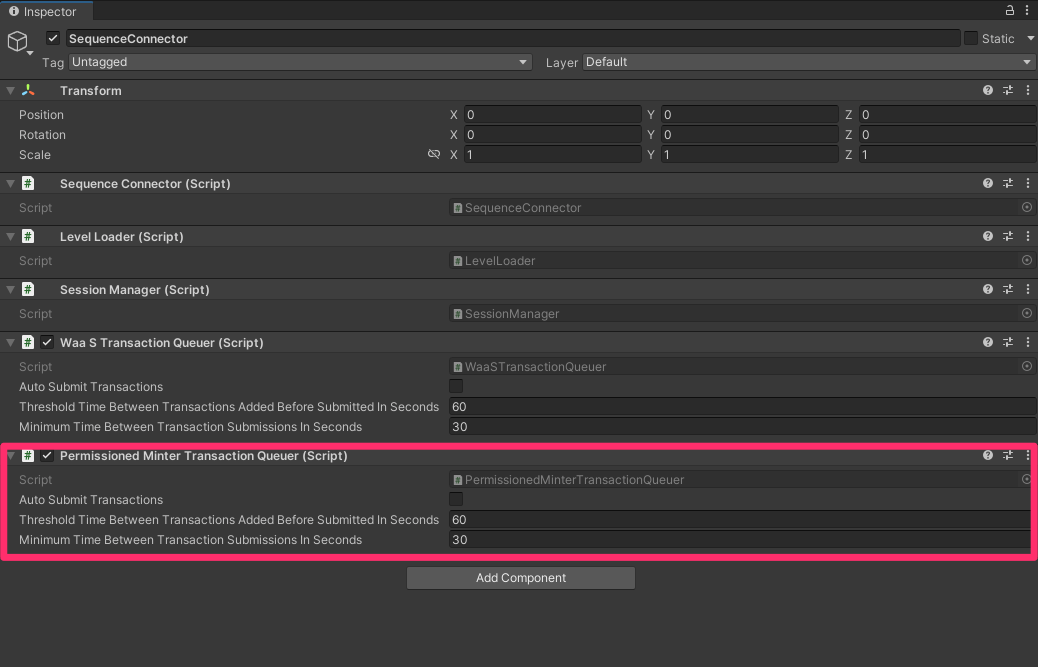 Once [this is setup](https://github.com/0xsequence/sequence-unity-demo/blob/JellyForest/Scripts/SequenceConnector.cs#L78), all we need to do when a token is collected is call "mint token".
```csharp theme={null}
public class CollectibleToken : Coin
{
protected override void ObjectPicked()
{
base.ObjectPicked();
if (SequenceConnector.Instance == null || SequenceConnector.Instance.Wallet == null)
{
Debug.LogWarning("No minting will happen. Make sure SequenceConnector is in the scene and user is logged in.");
return;
}
SequenceConnector.Instance.MintFungibleToken(); // [!code focus]
}
}
```
This will update our `Inventory` and add a mint transaction to the `PermissionedMinterTransactionQueuer`'s queue. The `PermissionedMinterTransactionQueuer` will automatically merge transactions together when possible so that you spend the least amount of money on gas fees as possible.
In Jelly Forest, we've configured our transaction queuer to submit transactions every time the player has a game over, but no sooner than every 30 seconds.
#### How Do You Determine How Often to Submit Your Transactions?
With our Unity SDK, this becomes more of a game design question than anything else.
Our `TransactionQueuers` can be configured to submit transactions automatically every X seconds, when promted (via function call) but no sooner than every Y seconds, or when prompted overriding any minimum time threshhold configured (Y seconds).
Here are some things to consider when determining how to configure your transaction queuers:
* The more frequently you submit transactions, the more gas fees you'll pay. Of course, the EVM-compatible blockchain you select will heavily influence the number and complexity of transactions you can submit before costs become prohibitive.
* The less often you submit tranactions, the further out of sync your game state (cache) will become with the information on-chain. If a transaction were to fail, you will need a way to recover from this without hurting your players' experience of the game.
As an example from Jelly Forest: we felt that the Shops' transactions were of high importance to the end user. We didn't want to risk a user thinking they had an upgrade/hat and then having the transaction fail and needing to either revoke the upgrade/hat or mint an extra one that the player may not have legitemately earned. So, we made it so that the user waits on the Shop pages until the purchase transaction (and all other transaction in the TransactionQueuers) have succeeded.
```csharp theme={null}
public async Task Buy()
{
if (Status != ItemStatus.Available)
{
return;
}
if (SequenceConnector.Instance == null)
{
string error = "SequenceConnector not found. User has not logged in";
Debug.LogError($"Failed to purchase shop item: {error}");
OnFailedToPurchaseShopItem?.Invoke($"Failed to purchase shop item: {error}");
return;
SequenceConnector.Instance.AddToTransactionQueue(new PurchaseShopItemQueueableTransaction(this));
TransactionReturn result = await SequenceConnector.Instance.SubmitQueuedTransactions(true, false); // [!code hl]
if (result is SuccessfulTransactionReturn successfulTransactionReturn)
{
BurnTokensFromInventory();
MintTokenInInventory()
if (string.IsNullOrWhiteSpace(successfulTransactionReturn.txHash))
{
GetTransactionReceipt(successfulTransactionReturn);
}
}
else if (result is FailedTransactionReturn failed)
{
string error = $"Transaction failed: {failed.error}";
Debug.LogError(error);
OnFailedToPurchaseShopItem?.Invoke($"Failed to purchase shop item: {error}");
}
else
{
throw new Exception("Unexpected transaction result type");
}
}
```
## 6. Burn In-game Tokens in Exchange for Others
In Jelly Forest, you can purchase powerups and cosmetics by burning coins and (sometimes) lower tier powerups.
To enable and enforce this mechanic, we deployed a simple [BurnToMint smart contract](https://polygonscan.com/address/0x80329e7f4F006E3178Db369425329759157B5a2a#code). This contract allows you to specify minting requirements (required token ids and associated amounts) for a given token id. When it receives a batch of ERC1155 tokens and the sender specifies the token id they want to mint in the `data` parameter, the contract will check if it received the required amount of each token id; if this passes, the contract burns the tokens and mints the requested token id to the sender (user); otherwise, the transaction fails and reverts.
We've given this contract minting permissions for our game contract in the Builder Console:
1. Find the contract under `Contracts` and click to open it
2. Click `Write Contract`
3. Expand `grantRole`
4. Under `role` enter `0x9f2df0fed2c77648de5860a4cc508cd0818c85b8b8a1ab4ceeef8d981c8956a6` - this is the Keccak-256 hash of `MINTER_ROLE`
5. Under `account` paste the minter's wallet address
:::danger
Warning: the `BurnToMint` smart contract shared above has not been audited by a third party. Re-use with caution!
:::
When a user purchases an upgrade or cosmetic from the shop, we send a transaction to the `BurnToMint` smart contract by adding a [PurchaseShopItemQueueableTransaction](https://github.com/0xsequence/sequence-unity-demo/blob/JellyForest/Scripts/Items/ShopItem.cs#L109) to our [SequenceWalletTransactionQueuer](https://github.com/0xsequence/sequence-unity/blob/master/Packages/Sequence-Unity/Sequence/SequenceSDK/Relayer/SequenceWalletTransactionQueuer.cs) in our `SequenceConnector`.
```csharp theme={null}
SequenceConnector.Instance.AddToTransactionQueue(new PurchaseShopItemQueueableTransaction(this));
```
## 7. Building the Shop Pages and Setting the Minting Requirements
When building the Shop Pages and setting the prices/minting requirements for the different upgrades and hats in Jelly Forest, we opted to define [ShopItems](https://github.com/0xsequence/sequence-unity-demo/blob/JellyForest/Scripts/Items/ShopItem.cs) using [Scriptable Objects](https://docs.unity3d.com/Manual/class-ScriptableObject.html) because they are easy to tweak and visualize since they can be serialized in the Inspector. These scriptable objects are also how we define what each [Item](https://github.com/0xsequence/sequence-unity-demo/blob/JellyForest/Scripts/Items/Item.cs) is and associate them with a token id.
However, it quickly became a pain (not to mention a potential source for bugs) to keep the minting requirements defined in the Scriptable Objects in sync with the minting requirements defined in our `BurnToMint` contract on-chain.
We created an [editor extension](https://learn.unity.com/tutorial/editor-scripting) for our `ShopItem` scriptable objects adding a button that, when pressed, will check if the minting requirements defined on-chain match what is defined in the scriptable object; if they differ, it will send a transaction to update the minting requirements in the `BurnToMint` contract on-chain to match the scriptable object. The transaction is submitted via an EOA wallet created from a private key stored as an environment variable on one of our developer's machines. This EOA wallet is the [owner](https://docs.openzeppelin.com/contracts/2.x/access-control#ownership-and-ownable) of this contract.
In fact, our Shop Pages actually query the smart contract every 60 seconds (and every time they open) for changes in minting requirements, updating their UI accordingly. This allows us to make live patches to our game's economy without requiring an update!
Click on the video below
See the [ShopItemEditorExtension implementation here](https://github.com/0xsequence/sequence-unity-demo/blob/JellyForest/Scripts/Editor/ShopItemEditorExtension.cs).
# 8. Leverage Purchased Items In-game
Ok great, our players can log in, get a wallet, earn tokens, and buy things with their tokens, all that's left is to give your players a reason to want to buy stuff in the first place. In other words, it's time to go work your game developer magic and build some awesome powerups and cosmetics!
All you have to do to bring your tokens into your game is check if the user owns enough of the given token id and apply the token's effect.
In Jelly Forest, we defined a few different [PowerUpTypes](https://github.com/0xsequence/sequence-unity-demo/blob/JellyForest/Scripts/Items/ItemCatalogue.cs#L13) and assign each `Item` a `PowerUpType` and tier. Then [we query our `Inventory` to find the best power up of each type](https://github.com/0xsequence/sequence-unity-demo/blob/JellyForest/Scripts/Inventory.cs#L138) that the player owns.
Once [this is setup](https://github.com/0xsequence/sequence-unity-demo/blob/JellyForest/Scripts/SequenceConnector.cs#L78), all we need to do when a token is collected is call "mint token".
```csharp theme={null}
public class CollectibleToken : Coin
{
protected override void ObjectPicked()
{
base.ObjectPicked();
if (SequenceConnector.Instance == null || SequenceConnector.Instance.Wallet == null)
{
Debug.LogWarning("No minting will happen. Make sure SequenceConnector is in the scene and user is logged in.");
return;
}
SequenceConnector.Instance.MintFungibleToken(); // [!code focus]
}
}
```
This will update our `Inventory` and add a mint transaction to the `PermissionedMinterTransactionQueuer`'s queue. The `PermissionedMinterTransactionQueuer` will automatically merge transactions together when possible so that you spend the least amount of money on gas fees as possible.
In Jelly Forest, we've configured our transaction queuer to submit transactions every time the player has a game over, but no sooner than every 30 seconds.
#### How Do You Determine How Often to Submit Your Transactions?
With our Unity SDK, this becomes more of a game design question than anything else.
Our `TransactionQueuers` can be configured to submit transactions automatically every X seconds, when promted (via function call) but no sooner than every Y seconds, or when prompted overriding any minimum time threshhold configured (Y seconds).
Here are some things to consider when determining how to configure your transaction queuers:
* The more frequently you submit transactions, the more gas fees you'll pay. Of course, the EVM-compatible blockchain you select will heavily influence the number and complexity of transactions you can submit before costs become prohibitive.
* The less often you submit tranactions, the further out of sync your game state (cache) will become with the information on-chain. If a transaction were to fail, you will need a way to recover from this without hurting your players' experience of the game.
As an example from Jelly Forest: we felt that the Shops' transactions were of high importance to the end user. We didn't want to risk a user thinking they had an upgrade/hat and then having the transaction fail and needing to either revoke the upgrade/hat or mint an extra one that the player may not have legitemately earned. So, we made it so that the user waits on the Shop pages until the purchase transaction (and all other transaction in the TransactionQueuers) have succeeded.
```csharp theme={null}
public async Task Buy()
{
if (Status != ItemStatus.Available)
{
return;
}
if (SequenceConnector.Instance == null)
{
string error = "SequenceConnector not found. User has not logged in";
Debug.LogError($"Failed to purchase shop item: {error}");
OnFailedToPurchaseShopItem?.Invoke($"Failed to purchase shop item: {error}");
return;
SequenceConnector.Instance.AddToTransactionQueue(new PurchaseShopItemQueueableTransaction(this));
TransactionReturn result = await SequenceConnector.Instance.SubmitQueuedTransactions(true, false); // [!code hl]
if (result is SuccessfulTransactionReturn successfulTransactionReturn)
{
BurnTokensFromInventory();
MintTokenInInventory()
if (string.IsNullOrWhiteSpace(successfulTransactionReturn.txHash))
{
GetTransactionReceipt(successfulTransactionReturn);
}
}
else if (result is FailedTransactionReturn failed)
{
string error = $"Transaction failed: {failed.error}";
Debug.LogError(error);
OnFailedToPurchaseShopItem?.Invoke($"Failed to purchase shop item: {error}");
}
else
{
throw new Exception("Unexpected transaction result type");
}
}
```
## 6. Burn In-game Tokens in Exchange for Others
In Jelly Forest, you can purchase powerups and cosmetics by burning coins and (sometimes) lower tier powerups.
To enable and enforce this mechanic, we deployed a simple [BurnToMint smart contract](https://polygonscan.com/address/0x80329e7f4F006E3178Db369425329759157B5a2a#code). This contract allows you to specify minting requirements (required token ids and associated amounts) for a given token id. When it receives a batch of ERC1155 tokens and the sender specifies the token id they want to mint in the `data` parameter, the contract will check if it received the required amount of each token id; if this passes, the contract burns the tokens and mints the requested token id to the sender (user); otherwise, the transaction fails and reverts.
We've given this contract minting permissions for our game contract in the Builder Console:
1. Find the contract under `Contracts` and click to open it
2. Click `Write Contract`
3. Expand `grantRole`
4. Under `role` enter `0x9f2df0fed2c77648de5860a4cc508cd0818c85b8b8a1ab4ceeef8d981c8956a6` - this is the Keccak-256 hash of `MINTER_ROLE`
5. Under `account` paste the minter's wallet address
:::danger
Warning: the `BurnToMint` smart contract shared above has not been audited by a third party. Re-use with caution!
:::
When a user purchases an upgrade or cosmetic from the shop, we send a transaction to the `BurnToMint` smart contract by adding a [PurchaseShopItemQueueableTransaction](https://github.com/0xsequence/sequence-unity-demo/blob/JellyForest/Scripts/Items/ShopItem.cs#L109) to our [SequenceWalletTransactionQueuer](https://github.com/0xsequence/sequence-unity/blob/master/Packages/Sequence-Unity/Sequence/SequenceSDK/Relayer/SequenceWalletTransactionQueuer.cs) in our `SequenceConnector`.
```csharp theme={null}
SequenceConnector.Instance.AddToTransactionQueue(new PurchaseShopItemQueueableTransaction(this));
```
## 7. Building the Shop Pages and Setting the Minting Requirements
When building the Shop Pages and setting the prices/minting requirements for the different upgrades and hats in Jelly Forest, we opted to define [ShopItems](https://github.com/0xsequence/sequence-unity-demo/blob/JellyForest/Scripts/Items/ShopItem.cs) using [Scriptable Objects](https://docs.unity3d.com/Manual/class-ScriptableObject.html) because they are easy to tweak and visualize since they can be serialized in the Inspector. These scriptable objects are also how we define what each [Item](https://github.com/0xsequence/sequence-unity-demo/blob/JellyForest/Scripts/Items/Item.cs) is and associate them with a token id.
However, it quickly became a pain (not to mention a potential source for bugs) to keep the minting requirements defined in the Scriptable Objects in sync with the minting requirements defined in our `BurnToMint` contract on-chain.
We created an [editor extension](https://learn.unity.com/tutorial/editor-scripting) for our `ShopItem` scriptable objects adding a button that, when pressed, will check if the minting requirements defined on-chain match what is defined in the scriptable object; if they differ, it will send a transaction to update the minting requirements in the `BurnToMint` contract on-chain to match the scriptable object. The transaction is submitted via an EOA wallet created from a private key stored as an environment variable on one of our developer's machines. This EOA wallet is the [owner](https://docs.openzeppelin.com/contracts/2.x/access-control#ownership-and-ownable) of this contract.
In fact, our Shop Pages actually query the smart contract every 60 seconds (and every time they open) for changes in minting requirements, updating their UI accordingly. This allows us to make live patches to our game's economy without requiring an update!
Click on the video below
See the [ShopItemEditorExtension implementation here](https://github.com/0xsequence/sequence-unity-demo/blob/JellyForest/Scripts/Editor/ShopItemEditorExtension.cs).
# 8. Leverage Purchased Items In-game
Ok great, our players can log in, get a wallet, earn tokens, and buy things with their tokens, all that's left is to give your players a reason to want to buy stuff in the first place. In other words, it's time to go work your game developer magic and build some awesome powerups and cosmetics!
All you have to do to bring your tokens into your game is check if the user owns enough of the given token id and apply the token's effect.
In Jelly Forest, we defined a few different [PowerUpTypes](https://github.com/0xsequence/sequence-unity-demo/blob/JellyForest/Scripts/Items/ItemCatalogue.cs#L13) and assign each `Item` a `PowerUpType` and tier. Then [we query our `Inventory` to find the best power up of each type](https://github.com/0xsequence/sequence-unity-demo/blob/JellyForest/Scripts/Inventory.cs#L138) that the player owns.